Website Redesign and SEO: How to Protect Rankings at Launch
You're looking at the new homepage, the branding finally feels right, and the mobile layouts are nearly ready for approval. Then someone asks what happens to the old product pages, campaign URLs and articles that still bring in enquiries. Nobody has a complete list, and the launch date hasn't moved.
That's where website redesign and SEO need to become the same conversation. A polished interface can improve the experience, but it won't protect search visibility unless the team also accounts for the addresses, content and technical signals people already use to find the business.
Table of Contents
Why Redesigns Quietly Erase Search Traffic - Decide what deserves protection
Design Decisions and the Content They Must Keep - Keep the meaning outside the artwork - Test the content without the presentation
How to Audit Every Live Page Before Sign-Off - Build the working inventory - Make decisions traceable
Building a Redirect Map That Holds at Launch - Implement and test the final path
A Redesign Where Structure Decided the Outcome - Turn findings into release controls - A documented public-sector comparison
Core Web Vitals as a Launch Requirement - Give visual features a performance budget - Test templates, not just the homepage
Launch in Phases and Monitor for Twelve Weeks - Validate production before declaring success - Keep the dashboard tied to business outcomes
Bring an SEO Specialist In Before the Sitemap Is Fixed - Ask these questions before committing
Why Redesigns Quietly Erase Search Traffic
Say a beauty brand launches a sleek new website. Within weeks, organic visits fall, but the team can't identify which landing pages disappeared or whether their replacements answer the same searches. The homepage looks better, so everyone starts looking elsewhere for the cause.
The visual layer usually isn't the problem. Developers changed category URLs, editors removed useful copy, and nobody implemented the redirects sitting in an unfinished spreadsheet. Search visitors now encounter missing pages or destinations that don't match what they searched for.
A redesign is an information-architecture and measurement project that happens to look different.
Search engines encounter the address of each page, its words and headings, and the speed and stability of the experience. A redesign can alter all of those at once. That makes an unmeasured rebuild difficult to diagnose: a traffic decline might reflect missing content, broken discovery paths, indexing restrictions or several problems together.
The discovery channel is too important to leave to chance. Ofcom's findings, reported in Statwharf's UK SEO statistics, put Google Search usage at 82% of UK online adults in May 2025. That doesn't guarantee traffic for any business, but it explains why search preservation belongs in the project scope.
Decide what deserves protection
Ecommerce and beauty brands are particularly exposed when products, collections and campaign pages change frequently. Agencies also need a defensible handover, while in-house teams may be responsible for years of accumulated search visibility that nobody has fully documented.
Protect the pages that attract qualified visitors, support conversions or earn relevant external links. Some should retain their addresses; others can be consolidated or retired deliberately. The distinction must come from evidence, not whether an old page fits the new visual direction.
Know which pages earn traffic before approving any layout. Without that starting point, the team is designing against an incomplete picture of the business.
Design Decisions and the Content They Must Keep
Design decision | SEO risk | How to protect it |
|---|---|---|
Navigation depth | Key pages buried several clicks down get less attention from users and crawlers | Keep key landing pages within two or three clicks of the homepage |
URL slugs | Renaming a slug changes an address search engines already index | Keep slugs on pages that already perform; redirect any that change |
Page titles and meta descriptions | Templates overwrite them with generic text | Export existing values and reapply them to the new templates |
Heading hierarchy | Skipped levels or headings used for styling confuse readers and crawlers | Use one H1 per page, then H2 and H3 in logical order |
Carousels and image-only text | Copy inside sliders or graphics is hard for search engines to read | Keep meaningful copy as live HTML text |
Platform and template changes | Trailing slashes, canonicals, sitemaps and structured data can shift silently | Crawl staging and production and compare the outputs |
Legal and accessibility pages | Missing privacy, terms or accessibility statements cost trust and indexed pages | Carry every legal page across and check its URL in the redirect map |
Brand copy replacing product copy | Removing category descriptions erases the words people search for | Keep descriptive copy on every category and product template |
Treat the navigation target as a practical design rule, not a search-engine ranking threshold. A commercially important collection shouldn't require visitors to work through a campaign hub, an editorial feature and a carousel before reaching it. Use descriptive menu labels and contextual links where they help someone make a decision.
Template consistency isn't the same as content uniformity. Reusable components should preserve distinct titles, headings, descriptions and product information rather than flattening every page into the same generic message. Export those fields before migration, then inspect the rendered result rather than assuming the CMS imported them correctly.
Keep the meaning outside the artwork
GOV.UK's accessibility guidance directs publishers to structure headings, avoid duplicate page titles and describe images. Those requirements are useful design constraints: choose heading levels for meaning, then control their appearance with styles.
Say an existing Our Story section explains a cosmetics brand's formulation approach and manufacturing background. Replacing it with an autoplaying video without a transcript removes information that visitors could previously read, access and search. Keep the substance as visible text, even if the video becomes the main visual feature.
Carousels need a more precise assessment than “sliders are bad for SEO”. Text rendered in accessible HTML can remain readable; words baked into slide artwork aren't an equivalent substitute. Don't make important product details depend on someone waiting for a later slide or triggering a script.
Test the content without the presentation
Disable images and, separately, test with scripts unavailable. These checks aren't complete accessibility or rendering audits, but they quickly expose pages whose meaning depends entirely on artwork or interaction.
A useful review asks:
Purpose: Can someone identify what the page offers from its text?
Sequence: Do the headings and paragraphs follow a sensible reading order?
Specificity: Are ingredients, materials, features and service details still present?
Action: Can visitors find the next step without relying on animation?
Strong brand identity design gives those details a coherent presentation. It shouldn't replace them with slogans. A cleaner layout only counts as an improvement when the content and functionality in the table survive launch.
How to Audit Every Live Page Before Sign-Off
The live-site audit must precede design sign-off because it establishes what the replacement site needs to accommodate. Otherwise, editors discover valuable pages after the templates and navigation have already been approved.
The operational gap is substantial: CloudSwitched's UK redesign guide reports that 46% of reviewed projects recorded baseline traffic and rankings, while only 18% maintained structured monitoring for twelve weeks after launch. These figures describe the projects reviewed, not every UK redesign, but they highlight why ownership and measurement need explicit deliverables.
Build the working inventory
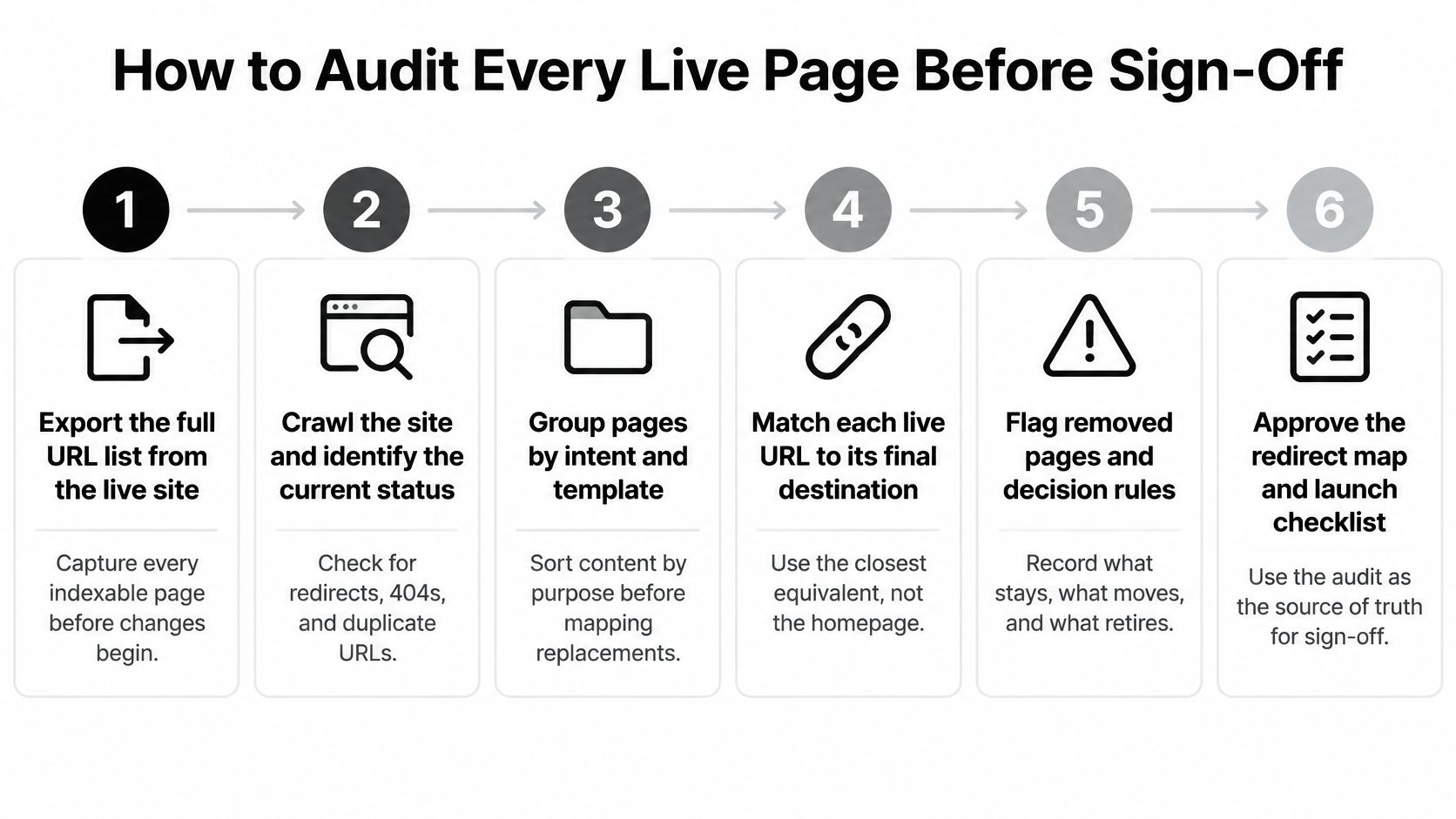
Export the full URL list from the live site and its sitemap. Combine a crawler export with sitemap entries, CMS exports and historical landing pages so the menu doesn't define the scope. Keep staging-only additions in a separate reconciliation tab rather than confusing them with existing live addresses.
Pull organic landing-page performance. Use a twelve-month working window in analytics and Search Console where available, sorting pages by organic clicks and conversions to expose seasonal and commercially useful content. Don't confuse all-channel traffic with organic performance, and check that conversion tracking worked during the comparison period.
Record the page-level signals. Put each title, meta description, H1, canonical tag and internal-link information beside its URL in the same sheet. A CMS field export alone can miss what the template renders, so compare it with a crawl.
Mark every URL as keep, merge or retire. Record the proposed destination and the person who approved the decision, including the reason for consolidation or removal. “Not in the new sitemap” isn't an adequate retirement decision.
Flag pages that attract external links. Use Search Console's links information or a backlink tool to identify destinations that other sites still reference. An apparently quiet archive page may have useful links even when its recent traffic is modest.
Capture the baseline before release. Save clicks, impressions, average position, indexed pages and a working set of the top fifty queries, alongside the reporting dates and filters. Taking the first export after launch means you've already lost the clean comparison.
The audit process should be visible to everyone approving the build.
Make decisions traceable
Add columns for destination readiness, content owner, redirect requirement and test result. Use exact URLs rather than page names, because similar labels can conceal different addresses or query parameters.
Sign-off condition: Every existing URL has a recorded decision, and every moved page has an approved destination.
The finished audit isn't a presentation deck. It's a working sheet that developers, editors and the SEO specialist can filter, test and update without reconstructing the reasoning behind each decision.
Building a Redirect Map That Holds at Launch
The redirect map turns approved content decisions into implementation rules. Give each retired URL its own row and match it to the closest relevant replacement, not whichever destination is easiest to configure.
Keep the map available during implementation and testing.
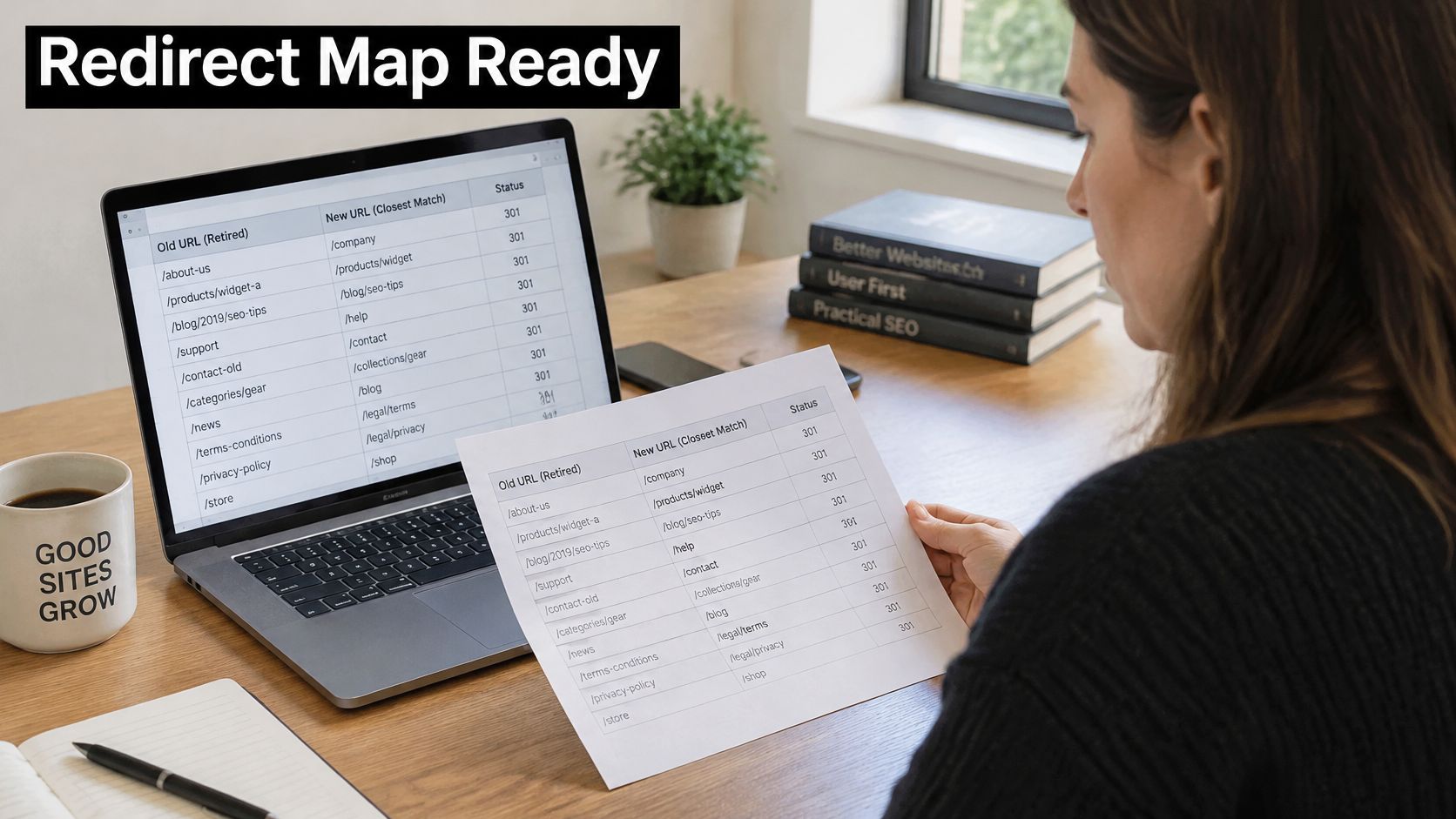
A discontinued moisturiser might have a genuine successor with comparable purpose and information. A general skincare homepage isn't automatically that successor. The redirect decision should reflect what the original visitor wanted, not just the category the old page occupied.
Implement and test the final path
Map directly to the final live destination. Don't use an intermediate URL that the new platform will redirect again.
Use a 301 for a permanent move, and verify the destination is available and indexable.
Reserve a 302 for temporary changes, with a named owner and review date.
Remove chains and loops. Test existing historical rules as well as newly added ones.
Check every mapped response on staging, using authenticated crawler access and the intended production rules.
Retain the map after launch, adding actual response codes, final destinations and unresolved defects.
Renfrewshire Council's SEO guidance distinguishes 301 permanent moves from 302 temporary moves and recommends removing redirect chains. It describes permanent redirects as transferring most of the original page's value, with possible loss, and warns against leaving temporary redirects unresolved for months.
Redirect type | Use when | SEO effect | Common mistake |
|---|---|---|---|
301 permanent redirect | The URL has moved for good | Transfers most of the original page's value, with a small possible loss | Pointing to the homepage instead of the closest match |
302 temporary redirect | The move is genuinely temporary | Signals a temporary destination; prolonged use can be interpreted as permanent | Leaving it in place after the redesign has launched |
Redirect chain | An intermediate redirect sits before the final page | Adds delay and complicates the migration path | An old URL points to an intermediate URL that also redirects |
Removed page with no equivalent | No relevant new page exists | A 404 or 410 communicates removal rather than a replacement | Mass-redirecting unrelated pages to the homepage |
When there's no equivalent content, return an appropriate 404 or 410 and provide useful navigation on the error page. Don't disguise a deliberate removal as a relevant migration.
Use the video alongside the implementation review, not instead of testing your own map.
Creating the map after launch leaves real visitors testing it for you. Finish it while incorrect destinations, loops and temporary rules can still block release.
A Redesign Where Structure Decided the Outcome
Consider a design studio moving its website from one platform to another. The staging build looks convincing, but comparing it page by page with the live site reveals broken links first, then missing legal pages, leftover template branding and no redirect plan.
None of those defects is obvious from a polished homepage presentation. The broken links interrupt journeys, the missing pages leave gaps in the site, and the template branding undermines confidence. Without a migration plan, the team also has no agreed treatment for existing search landing pages.
Turn findings into release controls
The useful response is to create working documents rather than another visual review:
A page-level audit records missing content, broken links and template defects against exact URLs.
A redirect map gives each changed address an approved destination.
A phased launch checklist specifies destination checks, responsible people and release conditions.
An SEO specialist can work from those documents alongside the design team. That avoids a handover where the specialist receives finished screens but no explanation of what happened to the original site.
The same discipline matters when the redesign covers only part of a larger website. Steeve Elgui worked with L'Oréal on a new design element for its websites, delivered as a full redesign of a site area. A defined visual scope still needs clear boundaries around shared navigation, templates and content dependencies.
The collaboration needs to connect interface decisions with implementation checks.

A documented public-sector comparison
The Government Digital Service's GOV.UK launch comparison describes mapping Directgov and Business Link URLs to relevant destinations, sending search users to 2,380 different pages; it also records average pages per visit rising from 2.5 to 3.5 and bounce rate falling from 55% to 13%.
Those engagement changes aren't proof that redirects alone caused the improvement. They do demonstrate a launch approach that considered search continuity and user journeys together. Redirect planning is information architecture, because someone must decide which new page fulfils the old page's purpose.
Core Web Vitals as a Launch Requirement
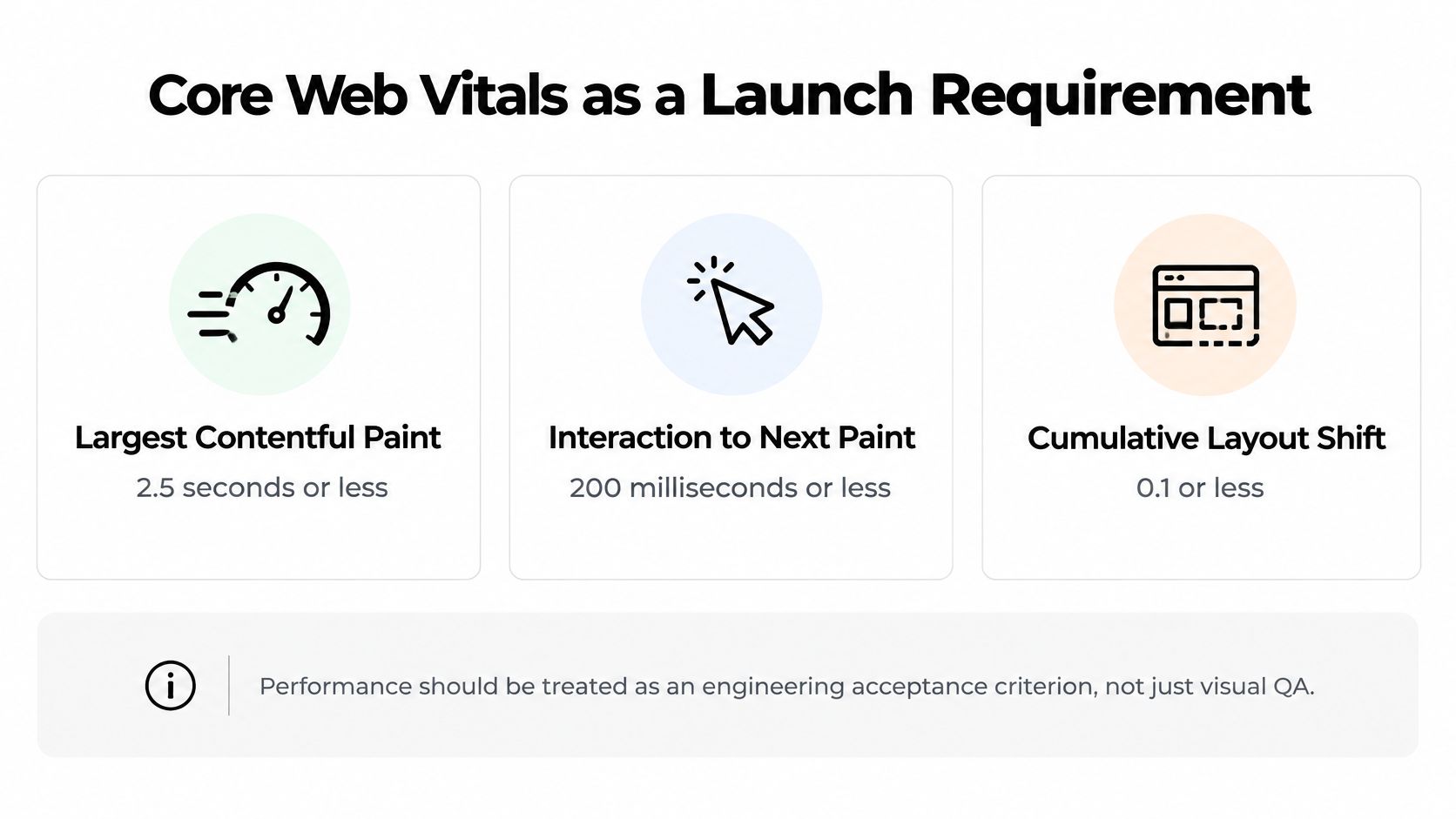
Treat performance as an engineering acceptance criterion, not the final item on a visual QA list. ProfileTree's website performance guide gives the good Core Web Vitals thresholds as LCP of 2.5 seconds or less, INP of 200 milliseconds or less, and CLS of 0.1 or less.
Metric | Good threshold | What a redesign usually breaks |
|---|---|---|
Largest Contentful Paint (LCP) | 2.5 seconds or less | Oversized hero images, video and render-blocking scripts |
Interaction to Next Paint (INP) | 200 milliseconds or less | Heavy JavaScript, animation libraries and third-party tags |
Cumulative Layout Shift (CLS) | 0.1 or less | Images, ads or embeds without reserved dimensions |
These metrics describe different failures. Visitors wait for the main content, interact with a page that responds late, or try to select an element that shifts beneath their finger. A visually impressive prototype doesn't reveal how the implemented page behaves on a constrained mobile device.
Use these criteria during development reviews.
Give visual features a performance budget
Resize assets to their rendered dimensions, provide responsive image variants and use WebP or AVIF where suitable. Reserve space for images, video and embeds before they load. Defer non-critical JavaScript and question animation libraries or tracking tags that add work without supporting a meaningful user need.
Peterborough's web content guidance uses 1,250 pixels at 72 dpi as its full-width image requirement and warns that larger images increase file size and loading time. Use that as a council publishing benchmark for hero assets, not a universal ceiling: responsive layouts and high-density displays still need appropriate variants, and pixel dimensions and compression matter more to browser delivery than the dpi label.
Performance trade-off: Keep the visual feature only if the team can deliver it without making the core task slow or unstable.
Test templates, not just the homepage
Check product, category, landing and article templates in PageSpeed Insights. Compare the existing site's CrUX field data with lab tests of the replacement; staging won't necessarily have real-user data of its own.
Resolve unnecessary redirect hops before testing complete journeys. Then repeat tests with representative content, embeds and production scripts enabled, because an empty template can pass while a populated page fails. After launch, use field data to assess the devices, networks and interactions that controlled tests can't reproduce.
Launch in Phases and Monitor for Twelve Weeks
Separate release into controlled stages: final staging approval, production deployment, immediate validation and ongoing review. Each stage needs an owner who can stop the next one when a critical check fails.
Before deployment, verify destination readiness, test permanent redirects for a direct response, and compare staging with the intended production configuration. Protect staging with authentication, then confirm that staging-specific indexing restrictions won't accidentally appear on the live site. Agree how the team will restore the previous release if a serious defect prevents important journeys from working.
Validate production before declaring success
Immediately after release, crawl production, test priority landing pages and confirm analytics events and enquiries reach their destinations. Publish the updated XML sitemap, submit it in Search Console, and inspect representative URLs for rendered content, canonicals and indexability.
Measure | Source | What a drop or adverse change signals |
|---|---|---|
Clicks and impressions by page | Search Console | Possible lost visibility on retired or moved URLs |
Average position for top fifty queries | Search Console | Possible ranking loss where a replacement missed its intent |
Indexed pages | Search Console coverage report | Pages dropped from the index or new duplicates |
404 responses on retired URLs | Server logs | A missing redirect or an intentionally removed page |
Redirect chains and temporary redirects | Crawl tool | Extra hops adding delay, or temporary rules left after launch |
Core Web Vitals field data | CrUX and PageSpeed Insights | Template regressions in loading, interaction or stability |
These are diagnostic signals, not automatic verdicts. A smaller indexed-page count can reflect approved consolidation; an unexpected loss among valuable landing pages needs investigation.
Keep the dashboard tied to business outcomes
Run weekly checks throughout the twelve-week monitoring plan. Review retired-URL requests in server logs, inspect indexing reports, revisit temporary redirects against their review dates and track field performance across the sample templates.
Compare equivalent reporting periods and annotate releases, campaign changes and tracking fixes. Keep clicks and impressions beside click-through rate, organic enquiries, purchases and conversion rate, so an apparently stable ranking doesn't conceal fewer useful visits.
Assign responsibility and access in the website redesign proposal, rather than assuming the launch team will remain available indefinitely. The dashboard should distinguish a technical defect from a change in demand or search-result behaviour, with a named person responsible for investigating each.
Bring an SEO Specialist In Before the Sitemap Is Fixed
Bring an SEO specialist in before the sitemap is fixed, not after launch. That's the right point whenever the site already earns meaningful organic traffic, its URL structure will change, or it's moving platform. Waiting until development is complete makes structural corrections more expensive and narrows the available options.
On the design side, ownership covers URL structure, content mapping, redirect requirements, heading order and performance-aware layouts. The specialist adds keyword strategy, technical checks and post-launch monitoring, while developers implement and test the agreed behaviour. Everyone should use the same audit sheet and redirect map, not separate URL lists that drift apart.
Ask these questions before committing
Which addresses matter most? Identify the URLs earning valuable organic clicks and explain which should retain their address.
Who approves removal? Name the person signing off each merge or retirement, including the commercial consequences.
How will implementation be proved? Agree how redirects and destination pages will be tested on staging before development is locked.
Put those answers in the website design brief. A short starting brief is enough: cover the business, goals, design support needed, budget and preferred timing, then develop the detailed migration responsibilities together.
We work directly with brands and with agencies, including within established creative teams or as the designer for a specific brief. That makes clear ownership especially important when the person approving a layout isn't the person responsible for organic performance.
This week, export the URL inventory from the live site and its sitemap. Every useful conversation about the replacement structure starts with that file.
Steeve Elgui offers UX/UI design, journey mapping, wireframes and brand integration for website redesigns, with structure and content continuity considered alongside the interface. Visit Steeve Elgui with a short outline of your current site, redesign goals, platform, budget and preferred timing to discuss design support that works alongside your SEO specialist and development team.
Comments